


What Does Collate Mean in Printing?
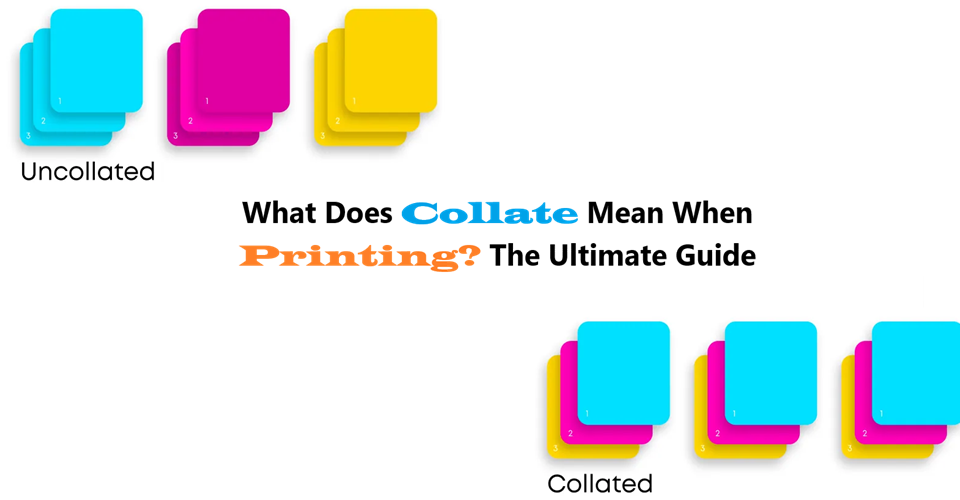
Collating means grouping and arranging printed pages to maintain the original document structure. In contrast, uncollated printing results in a bulk stack of the same pages rather than a neatly ordered document.
Purpose
When printing large documents, collate printing is essential for keeping pages in order. Collating arranges printed documents in a specific order, which improves organization, workflow, and professionalism. Whether you’re printing multiple copies of multi-page documents like reports, presentations, manuals, and invoices, or large datasets, enabling collated printing ensures accuracy and readability.
What is Collate?
Collate means to automatically position multi-page documents into their right chronological order so that each complete set of pages is printed together, instead of all copies of page one, then all copies of page two, and so forth. This feature guarantees that each separate document is a complete, ready-to-use set, saving time and effort as opposed to manual sorting of pages, particularly for reports, manuals, and booklets.
How It Works:
Collating Is an Essential Part of Printing
A printer does collating automatically when the setting is enabled. Instead of printing all copies of page 1 first, followed by all copies of page 2, a collated printing job will produce full document sets in the correct order.
For example:
Collated printing prints multiple document copies in order:
- Copy 1: Page 1, Page 2, Page 3
- Copy 2: Page 1, Page 2, Page 3
- Copy 3: Page 1, Page 2, Page 3
Uncollated printing outputs:
- All Page 1s
- All Page 2s
- All Page 3s
Example:
A corporate office printing reports, presentations, manuals, and invoices benefits from collate printing to ensure complete document sets are ready for distribution.
What does collated printing mean? It means print jobs are structured to avoid manual sorting, making processes smoother and faster.
Benefits:
Why Use Collate?
- Time-Saving: Reduces manual sorting efforts.
- Accuracy: Ensures all document pages remain in order.
- Professionalism: Helps produce polished, well-organized materials.
When to Use Collate?
Collation is ideal for:
- Multiple copies of multi-page documents
- Reports, presentations, manuals, and invoices
- Legal and business documents
- Training materials
What Does Collate Printing Mean?
Collate printing meaning refers to the process of arranging multiple pages of a document in a specific order before finalizing a print job.
When Not to Use Collate?
Disabling collation is useful for:
- Single-page documents like flyers or standalone sheets
- Documents with different page sets requiring manual assembly
How to Collate:
How to Collate in Printing
- Look for the “Collate” option in your printer settings.
- Select “Collate” or “Sort” when printing.
- Ensure your document preview displays pages in sequence before confirming.
Collated vs Uncollated Printing
| Feature | Collated Printing | Uncollated Printing |
|---|---|---|
| Definition | To arranging the pages or components of a multi-page document or packaging in a specific, organized order | Pages printed in bulk, grouped by page number |
| Best for | Multiple copies of multi-page documents | Single-page documents or non-sequential prints |
| Example | Reports, presentations, manuals, and invoices | Flyers, forms, and tickets |
How Does Collate Relate to Double-Sided Printing?
Does Collate Mean Double Sided?
No, collate does not mean double-sided; they are different printing tasks. Collate means to position pages in the right order for several copies of a file, whereas double-sided (or duplex) printing refers to printing on both sides of a single piece of paper. You can print collated documents which are single-sided or double-sided.
| Feature | Function |
| Collate | Positions all the pages for each copy of a file in the precise order. For instance, when printing three copies of a 5-page report, a collated print job will yield three separate, whole sets of pages (1-5, 1-5, 1-5). |
| Double-sided (Duplex) | Prints on both sides of a lone sheet of paper, which helps lessen paper consumption. |
How to Turn Off Double-Sided Printing?
If double-sided printing isn’t required:
- How to turn off double sided printing: Uncheck the Double-Sided option in the print settings.
- How to not print double-sided Mac: Disable Two-Sided Printing in the print dialog under Layout.
What Does Collated Printing Mean?
When printing professional documents, collate printing means pages remain in the correct order. It refers to arranging the pages or components of a multi-page document or packaging in a specific, organized order.
Collated Printing vs. Uncollated Printing in Different Industries
| Industry | Uses Collated Printing | Uses Uncollated Printing |
|---|---|---|
| Corporate | Reports, legal documents | Forms, handouts |
| Education | Study materials, exams | Worksheets, quizzes |
| Publishing | Books, magazines | Flyers, posters |
| Medical | Patient records, charts | Test results, labels |
What Does Collate Printing Mean in Everyday Use?
- Office Printing: When printing multiple copies of multi-page documents, collated printing prints in sequence.
- Publishing: Collated printing is used in book production.
- Academic Printing: Research papers follow collated printing means for accuracy.
How Collated Printing Saves Time and Money
- Eliminates manual sorting
- Reduces printing errors
- Enhances efficiency in bulk printing jobs
Final Thoughts
Whether printing manuals, reports, or invoices, collated printing helps maintain structure and professionalism. Collate printing meaning refers to the process of arranging multiple printed pages in a predetermined, logical order before binding or packaging.
For optimal collate printing, enable the setting on your printer and ensure that the document remains structured. Printing means creating well-organized, readable documents, and collate printing is the key to achieving that.
Need Help For A Printing Project?
Call iPackU, we are here to help our clients 24/7. If you need any help regarding printing and packaging, just give us a call or drop an email, our team will get back to you ASAP!